


HubSpot
MarketDesign Voices
AI + AEO
.svg)

I thought Breeze Assistant was fine. It could rewrite copy and summarize reports, which was helpful. But beyond that, I never found the output that impressive.
Then, over the last few months, I started noticing something.
The recommendations felt...better. They felt grounded in the context already inside HubSpot.
If you've used Breeze Assistant recently, maybe you have noticed the same thing. And if you wrote it off a while ago, it might be time to give it another look.
Looking through HubSpot’s recent product updates, I found several changes that may explain the difference I noticed. Breeze Assistant can use relevant HubSpot account context and, in supported tools, help review records, campaign data, reports, and workflow-related tasks. What it can access depends on your settings, permissions, subscription, and the data available in your portal.
Individually, those updates might seem incremental. Together, they may explain the difference I noticed in the quality of the recommendations.
In my experience, those changes have made the assistant more useful in the context of the work I'm already doing in HubSpot.
The biggest shift for me was seeing Breeze use data already available in my HubSpot account to inform its recommendations.
It wasn't just giving me recommendations. It was helping me understand why.
That doesn't mean I take every recommendation at face value. I still check the responses against what I know to be true, use my own judgement, and ask for source citations (they won't necessarily appear in every response).
Breeze can absolutely draft emails or rewrite blog posts, but if that's where your usage stops, you may be overlooking some of the other ways it can help.
For me, the bigger opportunity is being able to surface insights and recommendations using available HubSpot data, helping me make better decisions.
The quality of the answer depends on the quality of the question you ask.
Instead of asking:
"Write me an email."
I'm asking:
"Draft an email for [persona] on [topic]. Emphasize how [topic] [solves pain points], and include a CTA encouraging them to [action you want them to take]."
Instead of:
"Summarize this campaign."
I'm asking:
"Analyze the performance of our last campaign(s) using data from [timeframe]. Compare performance across key metrics and recommend what to continue or update."
That small shift changes the conversation.
You're no longer asking AI to create something from scratch. You're giving it more context about what you're trying to accomplish, who you're trying to reach, and what you want it to consider. The more relevant context you provide, the more useful the output can be.
The same principle applies to CRM-based personalization. The more useful and consistent your data is, the more relevant your marketing can become.
And when you're asking Breeze to use the data already in HubSpot, the same principle applies: the quality of the insight depends on the quality of the data available to it. If you're trying to identify your persona and job title is one of the factors, for example, but those titles are missing, outdated, or inconsistent in your CRM, Breeze can't magically fill in those gaps. You may get an answer, but it won't necessarily be accurate.
That's where I've seen the biggest value: combining the right context with the real data already in HubSpot.
Business question: How can I improve email performance?
When I'm working on an email campaign, I’ll ask Breeze to review the performance data available in HubSpot and identify patterns in my higher-performing emails. Then I’ll ask for ideas to improve email performance based on the specific outcome I’m trying to improve or persona I'm trying to reach.
Instead of generic ideas, I’m getting recommendations informed by performance patterns in the HubSpot data. To be fully transparent, there’s usually some additional prompting before I decide what’s worth trying. And if it makes sense, I may run an A/B test to see how the changes perform compared to my original approach.
This is probably my favorite use case because it combines AI recommendations with something marketers already understand: testing and learning.
Not all metrics are created equal. Focus on the metrics that connect to the outcomes you're trying to improve. We’ve written more about that in our guide to tracking marketing automation ROI.
Breeze isn't replacing strategy. It's helping identify patterns and what might be worth trying.
Business question: How can I increase landing page conversions?
I’ll ask Breeze to critique a landing page with the goal of increasing form submissions. It looks at the page performance data and provides recommendations based on what it finds, such as clarifying the messaging or reducing form friction, while also explaining why those changes may help improve conversions. I can also ask it to help me understand if one channel is converting better than another.
From there, I decide which recommendations are worth trying. I’ll either make the edits and watch the data or run an A/B test to see whether those changes actually improve conversion performance.
That’s what we do as marketers: look at what the data is telling us, make informed decisions, optimize based on our goals, and repeat. Breeze just provides a faster way to get there.
One thing I've learned: Your goal matters. Just like any other marketing asset, the objective can vary—and your prompt should too. When my goal changes, my prompt changes.
Landing-page performance is only one part of the larger website experience.
Business question: What patterns do we see across our customers?
When we were working on refining our ideal customer profile (ICP) within our target market, I asked Breeze to surface patterns across past and current client data available in HubSpot. It surfaced patterns in industry, employee size, and revenue where those fields were populated. I used the results to form or challenge an ICP hypothesis, then validate it against a defined sample.
Where are the outliers? Which segments appear strongest? Are there trends worth investigating further?
Instead of relying only on assumptions about who our ideal customer is, I used the data already inside HubSpot to uncover patterns.
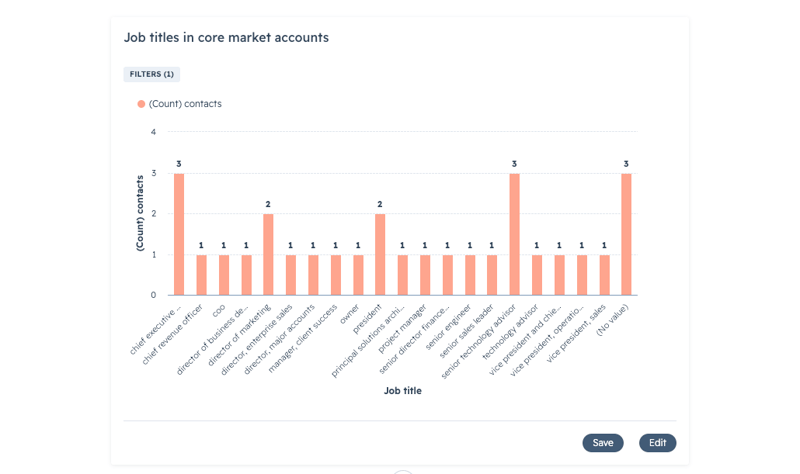
Business question: How is my campaign performing against my goals, and what should I adjust?
Instead of waiting until a campaign ends, I can ask Breeze to give me an update on my campaign. It pulls a performance overview and summary of the assets, noting what’s working. That gives me a quick way to see if anything looks off or if there’s anything worth investigating or testing further.
For me, this kind of on-demand summary is valuable when several campaigns are competing for attention
Is Breeze Assistant Perfect? No.
I still don't trust Breeze, or any AI tool, to make strategic decisions without validation.
Every once in a while, I've received a recommendation that wasn’t technically possible or didn’t quite fit the situation. Like any AI tool, the output still requires human judgment.
But if you’re using Breeze only to draft emails or rewrite blog posts, you may be overlooking some of the other ways it can help. One of the most useful applications I’ve found is using available HubSpot data to support decisions backed by real insights.
Breeze has improved. But the biggest shift for me isn't just what Breeze can do. It's how I use it.
The quality of the answer depends on the quality of the question.
If you ask Breeze to draft an email, it will give you a starting point. The value is the context you provide around the audience, goal, and relevant CRM data.
For me, the bigger shift isn’t creating more content. It’s using Breeze to examine what’s already happening in the business and decide what deserves a closer look.
So if you tried Breeze Assistant months ago and walked away thinking, "This is fine, but I'm not that impressed," I would encourage you to revisit it.
Start with a business question you already need answered.
You might see your data a little differently, or spot something worth looking into.

Growth on Purpose
100 Clinton Square
126 North Salina Street, Suite 404
Syracuse, NY 13202
.png?width=148&height=147&name=Mask%20Group%20(20).png)